
Are idle clicker games safe for kids?
Most idle clicker games are mild in content, but whether one is safe for your child comes down to purchases, ads and online features, all of which you can check on the App Store listing and control with Ask to Buy.
Idle games, also called clickers or incremental games, are simple: tap to earn, buy things that earn for you, watch a number grow, even with the phone in a drawer. There is no violence to speak of. The parts worth a parent's two minutes are the shop, the ads and anything that goes online.
Below we walk through those using the one listing we know best, because we make it: Cash Empire Clicker. The same six checks work for any clicker on the App Store.
Who this game is not for
- Families who want no shop at all. Cash Empire Clicker has ten optional in-app purchases. A paid game with no store will be calmer.
- Kids who find "bigger number" games hard to put down. Idle games are built around coming back. If that is a sore spot, pick a game with an ending.
- Parents who want zero chance-based choices. Market Calls let players pick a safe payout or a bold call with odds shown. No cash already earned can be lost, and it is fictional money, but it is still a choice between a sure thing and a chance.
Knowing the shop is half the safety check.
What the game actually shows, from the App Store screenshots
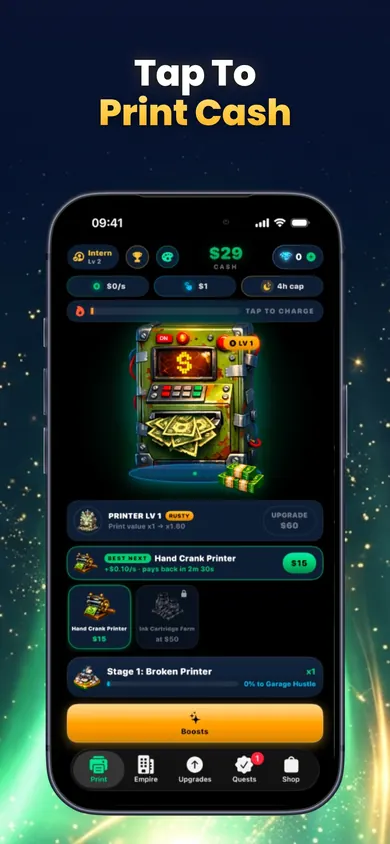
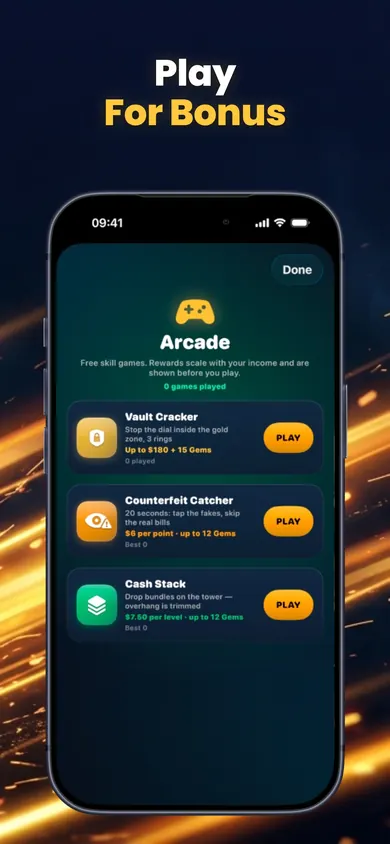
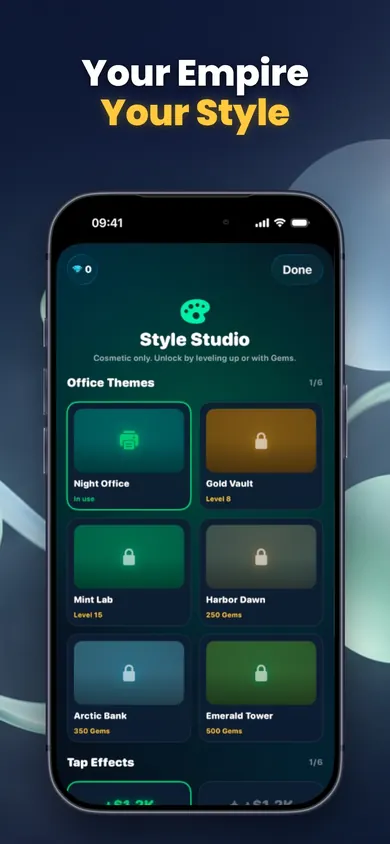
Six things to check in any idle clicker game
Left: what to look for. Right: what Cash Empire Clicker's App Store listing says, checked November 2026.
| Check | Where to look | Cash Empire Clicker |
|---|---|---|
| Age rating | Top of the listing | 4+ |
| Ads | Age rating panel, "Contains" | Listed as advertising; description says no forced ads |
| Purchases | In-App Purchases list | 10 items, $0.99 to $19.99; no subscription |
| Real money | Description | None: no cash-outs, betting or real-world value |
| Online features | Description, App Privacy | Optional sign-in for cloud backup and a global leaderboard, with name filtering and report and block tools |
| Data | App Privacy panel | Developer reports purchases, email, name, gameplay content and a user ID linked to you, for app functionality |
Every answer above is on the listing before you download.
Beginner parent, first evening
Here is a likely first evening. A nine-year-old asks for "the money printer game". You open the listing together, scroll to In-App Purchases and read the list out loud: Pocket Gems, Boost Pack, Billionaire Gems. You say no gems, no packs. They say fine and start tapping.
Twenty minutes later a request pops up on your phone for a $4.99 Vault of Gems. Ask to Buy caught it. You decline, and it becomes a conversation instead of a bank statement. That is the whole point of turning it on before the first tap.
Set the rule before the first tap, not after the first charge.
Honest limits
- We make Cash Empire Clicker, so treat our view of it as the maker's view. The table uses the App Store listing, not our opinion.
- The listing's age rating panel shows advertising, while the description promises no forced ads. Expect optional ads.
- Optional sign-in collects an email and name for cloud backup and the global leaderboard. Skip it and progress stays on the device.
- Idle games are designed for return visits: daily quests, weekly challenges, offline earnings. Screen Time limits help more than willpower.
Settings that do the heavy lifting
- Ask to Buy. Apple's Ask to Buy page (2026) says it is on by default and cannot be turned off for children under 18, depending on region. Each purchase request comes to you.
- Game Center restrictions. Apple's parental controls page shows how to block or allow Game Center friends and private messages under Content & Privacy Restrictions.
- Skip the sign-in. The game plays fully without an account.
Parent questions about idle games
Are idle clicker games safe for kids?
Most are mild in content, but check three things before saying yes: the in-app purchase list, whether the age rating panel lists advertising, and whether there is an optional online sign-in. Then turn on Ask to Buy so no purchase goes through without you.
Is Cash Empire Clicker gambling?
No real money is involved. The listing says it offers no real money, gambling, betting, cash-outs or investment services, and in-game currency has no real-world value. It does have Market Calls, a pick between a safe payout and a bold call with odds on screen, where you never lose cash you have. Some parents will still want to talk about that one.
What age is Cash Empire Clicker rated?
4+ on the App Store, as of November 2026.
How much can a child spend in Cash Empire Clicker?
The App Store lists ten in-app purchases from $0.99 (Pocket Gems) to $19.99 (Billionaire Gems), including Founder Lifetime at $14.99. With Ask to Buy on, each one needs your approval.
Does Cash Empire Clicker have ads?
The App Store age rating panel lists advertising, while the description promises no forced ads. Expect optional ads rather than none, and check the game yourself.
Does my child need an account to play?
No. Sign-in is optional and adds cloud backup and the global level leaderboard. Playing without it keeps progress on the device.
Can idle games teach kids about money?
A little, if you talk about it. Payback time and saving up are real ideas. Prices that grow with every purchase and numbers in the trillions are not real life, and the money is fictional.
Open Cash Empire Clicker in the App Store
Read the In-App Purchases list and the App Privacy panel yourself, then decide. Free on iPhone and iPad.

Open Cash Empire Clicker in the App Store
Updated November 2026
Related
- Cash Empire Clicker: the idle money clicker that prints offlineTap a broken money printer, hire managers, research upgrades and prestige. Cash Empire keeps printing offline. Free, no forced ads, fictional money.
- How do idle games work? A beginner storyIdle games pay you while you're away, then make costs outgrow income so you reset. Scratch a return slip and follow one 5-minute first session.
- Idle game upgrade payback calculatorType in up to three upgrades and your income per second. See which pays back first, plus a 7-day plan for your first week in an idle clicker.
- How to play idle games without spending moneyMost idle-game walls are time walls, not money walls. Sort 6 real paywall moments and see the free route for each. Fictional cash only.