Which games don't cause motion sickness?
Games where the camera barely moves are the least likely to cause motion sickness: turn-based puzzles first, then 2D games with a fixed side-on camera, with first-person 3D games the most likely to bother you. Settings matter almost as much as genre, so switch off screen shake and heavy effects before your first run.
The reason, according to the NHS, is a mismatch: your inner ear feels stillness while your eyes report movement. It is not only a VR problem; a 2008 study in the journal Human Factors found that some players of ordinary console games became motion sick too.
Less camera movement plus fewer effects equals fewer mixed signals.
Your 2-minute comfort setup, step by step
- 0:00 On iPhone, open Settings > Accessibility > Motion and turn on Reduce Motion. Apps that honor it, like Fluxo, tone down their animation.
- 0:30 In Fluxo's comfort options, switch screen shake off and reduced effects on. These are Fluxo's own comfort toggles for its busier visuals.
- 1:00 Turn haptics off if buzzing adds to the feeling. Music and sound have their own toggles too.
- 1:30 Start in Zen mode: relaxed practice with no wipeouts, so there is no rush to restart.
- 2:00 Play one short run, then stop and check in with yourself before the next one.
Settings first, short runs second, Hyper mode last.
Game tips for playing a runner without feeling sick
 eyes here, not the walls
Keep the phone still. Rest your elbows on a table so the screen stays put; a swaying phone adds movement your eyes have to track.
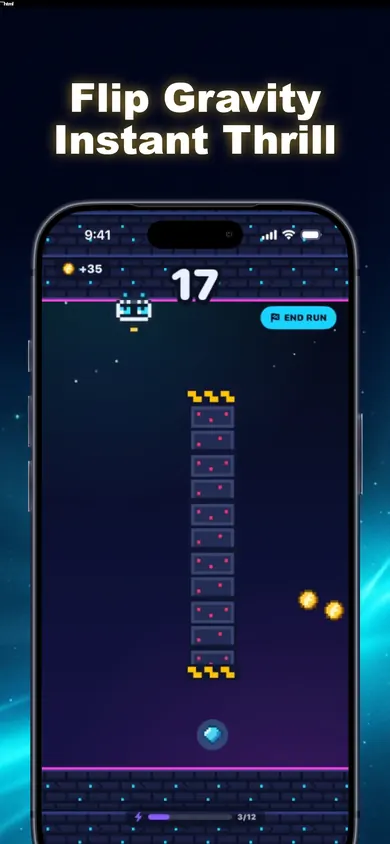
Look ahead, not around. Fix your eyes on your pilot and the obstacle coming next, not on the tunnel edges scrolling past.
Respect the sectors. Every 8 points brings a new sector. Speed Surge is faster; if that is your trigger, stop at the sector change.
Skip Hyper at first. Hyper is faster with double gold. Classic and Zen move slower.
Short sessions. PLAY AGAIN restarts instantly, which makes it easy to keep going. Decide on three runs before you start.
Who Fluxo is not for
- Anyone sensitive to flashing or bright colors. It is a neon game with a rainbow FEVER mode. Pick a calm puzzle game instead.
- Players who get sick from any scrolling. Even with comfort settings the tunnel moves. A turn-based puzzle will suit you better.
- Car or bus passengers. The NHS advises against using electronic devices while travelling if you get motion sick.
Motion sickness and games: the comparison in one strip
A player we built the comfort toggles for
Picture someone who loved old side-scrollers but had to quit a first-person shooter after ten minutes and a headache. They want something quick on the phone, but the first neon runner they try shakes on every crash. That is who the shake toggle and reduced effects are for, and why Fluxo follows iOS Reduce Motion: the setting they already chose carries over. Our design decision for them: Zen mode has no wipeouts, so the first runs are practice with nothing at stake.
Motion sickness questions
Why do some video games cause motion sickness?
Motion sickness happens when your inner ear and your eyes disagree, as the NHS explains. In a game your eyes see fast movement while your body sits still, and for some people that mismatch is enough to cause dizziness, nausea or a headache.
Can games on a normal screen cause motion sickness, not just VR?
Yes. Researchers writing in Human Factors in 2008 studied ordinary console games played on a regular screen and found that some players became motion sick.
What kind of games are least likely to cause motion sickness?
Games with a fixed camera and little screen movement: turn-based puzzles, board games and card games move the least. Among action games, 2D side-on games with a steady camera usually move the view less than first-person 3D games, though fast scrolling can still bother some people.
What settings help with motion sickness in games?
Look for options to turn off screen shake, camera bob and motion blur, reduce visual effects, and widen the field of view in 3D games. On iPhone, Settings > Accessibility > Motion > Reduce Motion is respected by apps that support it, including Fluxo.
Does Fluxo have motion sickness settings?
Fluxo has comfort options to toggle screen shake, reduced effects, music, sound and haptics, and it honors iOS Reduce Motion. Zen mode lets you practice with no wipeouts. It is still a fast runner, so it will not suit everyone.
What should I do if a game makes me feel sick?
Stop playing. The NHS advice for motion sickness includes looking at a fixed point such as the horizon, getting fresh air, and closing your eyes and breathing slowly. This is general information, not medical advice. Talk to your clinician.
This is general information, not medical advice. Talk to your clinician.
Play free on iPhone
Turn on Reduce Motion, switch off screen shake, start in Zen, and play free on iPhone one short run at a time.

Updated November 2026
Related
- Fluxo: the one-tap gravity flip runnerOne tap flips gravity. Ride the floor or ceiling of a neon tunnel past spikes, pistons and laser gates. Free on iPhone, plays offline.
- Video games making you dizzy? What to do nextFeeling dizzy or queasy during a game? Three steps to take now, why it happens, and how to plan a gentler next session. Sourced from the NHS.
- Easy phone games for non-gamers, answeredEasy phone games for non-gamers: what makes a game easy to pick up, one honest one-tap pick, its ads and limits, and who should try something calmer.
- Games like Geometry Dash but easierGeometry Dash too hard? A plain comparison of Geometry Dash Lite, Geometry Dash and Fluxo, checked against their App Store listings, plus 4 easier steps.