Why do video games make me dizzy?
Video games make some people dizzy because the eyes see fast movement while the inner ear feels the body sitting still, and that mismatch is a form of motion sickness. Stop playing, rest your eyes on something still, and next time choose games and settings that move the view less.
In plain words: your eyes say you are moving, your body says you are not, and your stomach takes the argument personally.
Your first questions
Why are video games making me dizzy?
Most often it is a form of motion sickness. The NHS guidance on motion sickness explains it as your inner ear and your eyes sending mismatched signals; in a game your eyes see movement while your body is still.
Is it normal to get dizzy from video games?
It is common enough that researchers study it on ordinary screens, not just in VR: a 2008 Human Factors study of console games found that some players became motion sick. If you get dizzy without games, or it does not pass, talk to a clinician.
How long does game dizziness last?
For many people it eases soon after they stop and rest, but it varies. If symptoms last, keep coming back, or come with other symptoms, get medical advice.
Can I build up tolerance to games that make me dizzy?
Some players find shorter sessions and gentler settings help over time, but there is no guarantee. Do not push through symptoms to train yourself.
What games are less likely to make me dizzy?
Games where the view moves less: turn-based puzzles, card and board games, and 2D games with a fixed side-on camera. First-person 3D games move the view the most.
Does Fluxo have settings for dizziness?
Fluxo has comfort options to toggle screen shake, reduced effects, music, sound and haptics, honors iOS Reduce Motion, and has a Zen mode with no wipeouts. It is still a fast scrolling runner, so it is not a cure and not for everyone.
Dear player,
You were three sectors into a run, or maybe ten minutes into a shooter, and the room started to tilt. Your mouth felt odd. You told yourself one more go, then the next one went worse. We make Fluxo, a fast neon runner, so this letter might seem strange coming from us. But we would rather you put the phone down tonight and come back next week than keep playing through it.
Here is the story we hear most: someone tries a game on the sofa after dinner, holding the phone close and moving it with every flip. Twenty minutes later they feel sick and decide games are not for them. Often it was the combination, not the game alone.
The fix is usually less: less camera movement, fewer effects, shorter sessions.
How to come back gently, in 3 steps
- Wait until you feel completely fine. Not on the same evening if it was strong.
- Change the settings before you play. On iPhone, Settings > Accessibility > Motion > Reduce Motion. In the game, switch off screen shake and turn on any reduced-effects option.
- Set a short limit before you start. Decide on two or three runs, then stop while you still feel good.
What might be making you dizzy: a comparison
Plan your next session
Two taps: how fast the dizziness came on, and what kind of game it was. We suggest a gentler first session back.
If you do try Fluxo, here is what it looks like
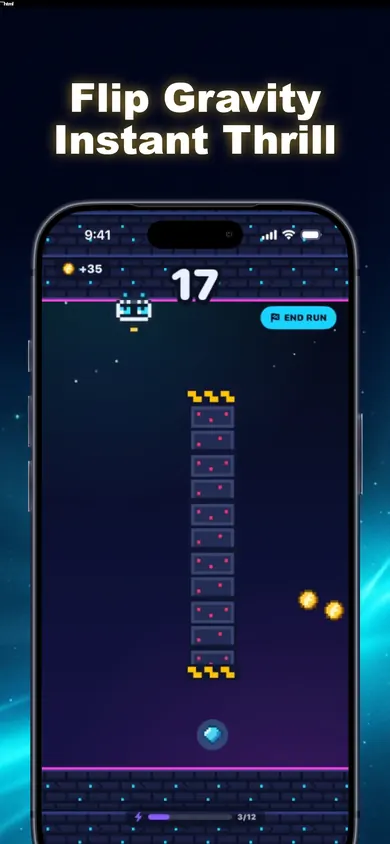


Honestly: Fluxo is a fast runner with neon colors and a rainbow FEVER mode, so it is not the gentlest game you could pick. What it does have is a fixed side-on camera, toggles for screen shake and reduced effects, support for iOS Reduce Motion, and Zen mode with no wipeouts. The game is free with ads; a one-time premium purchase removes house-ad breaks. If scrolling of any kind makes you dizzy, choose a turn-based puzzle instead.
One design decision we stand by: PLAY AGAIN restarts instantly. Great for flow, risky for anyone who should stop. So decide your run count before you open the app.
Take care of yourself first. The game will still be there.
The Fluxo team at Honest Little Apps
This is general information, not medical advice. Talk to your clinician.
Try it tonight, gently
Only if you feel fine: Reduce Motion on, shake off, Zen mode, three runs. Try it tonight, then stop.

Updated November 2026
Related
- Fluxo: the one-tap gravity flip runnerOne tap flips gravity. Ride the floor or ceiling of a neon tunnel past spikes, pistons and laser gates. Free on iPhone, plays offline.
- Games that don't cause motion sickness: a settings guideWhich games are easier on motion-sick players? Camera styles compared, plus a 2-minute comfort setup: shake off, effects down, Reduce Motion on.
- Easy phone games for non-gamers, answeredEasy phone games for non-gamers: what makes a game easy to pick up, one honest one-tap pick, its ads and limits, and who should try something calmer.
- Games like Geometry Dash but easierGeometry Dash too hard? A plain comparison of Geometry Dash Lite, Geometry Dash and Fluxo, checked against their App Store listings, plus 4 easier steps.