
Which iPhone games work in airplane mode?
A game works in airplane mode only if it was built to play offline: no ads to load, no sign-in check at launch and no content still waiting to download. The App Store listing often says it outright. The only real proof is a five-minute test at home with airplane mode switched on.
Sometimes. Apple's own Airplane Mode support page (February 2026) says: “If the airline allows it, you can still use Wi-Fi and Bluetooth in Airplane Mode.” But in-flight Wi-Fi can be paid, slow or patchy. A game that needs it is a game you might not get to play.
Short version: offline games are the ones you tested offline.
How RushOrb plays offline in 3 steps
- Download at home. Get RushOrb on Wi-Fi the night before you fly. It is free, with no account to create.
- Open it once online. Roll the first stage of The Thaw so the game has settled in. Then switch airplane mode on.
- Play the whole flight. 36 hand-built stages across six regions, an Endless mode and 35+ orbs and trails to collect with coins you earn by playing. No ad break waits behind any of it.
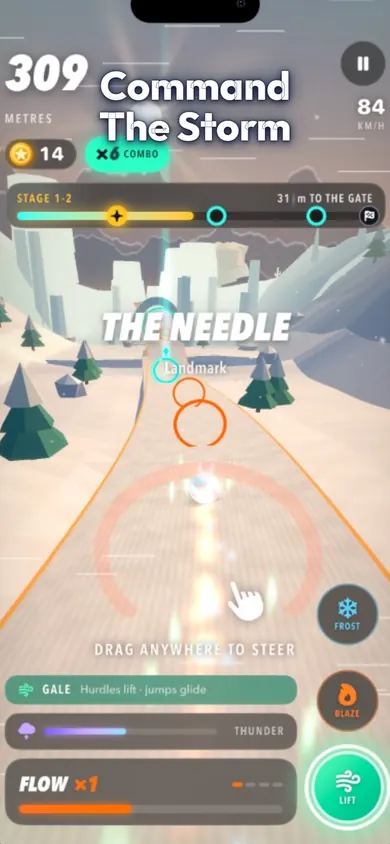
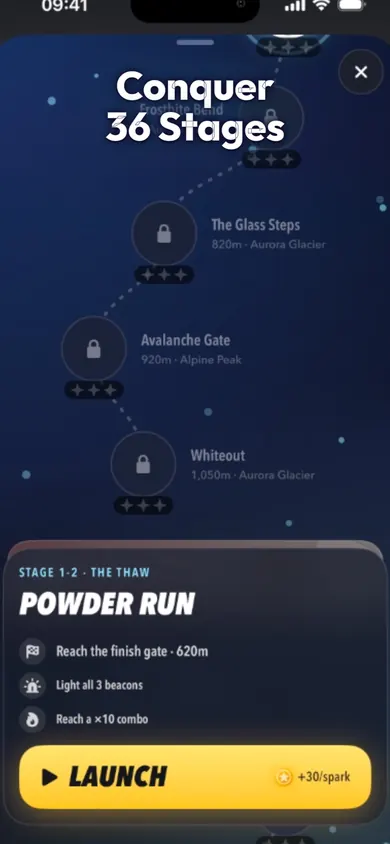
Three steps, and the game needs nothing from the network after that.
Who should pick a different flight game
No, and we would rather say so here than in a one-star review.
- Long-haul thinkers. RushOrb is fast and reflex-heavy. For a ten-hour flight, pair it with a slow puzzle or a story game you can play half asleep.
- Two-player seatmates. It is single player. Pass-and-play card games suit siblings sharing a tray table better.
- No-purchase rules. There are no ads, but there are optional cosmetic packs and a RushOrb Plus subscription. If a child plays on your account, turn on purchase approval first.
- Android tablets. RushOrb is iPhone only.
A good travel lineup mixes one quick game with one slow one.
Run the 5-minute airplane mode test
Do this the night before you fly, for every game on every device that is coming with you. Start the timer and follow along; each step lights up when it is time.
- 0:00 Airplane mode on. Swipe into Control Center and tap the plane. Make sure Wi-Fi is off too, or the test proves nothing.
- 0:30 Quit and reopen. Swipe the game away in the app switcher, then open it fresh. Watch for a spinner, a sign-in screen or “no connection”.
- 1:30 Play a full level. Finish one run or round, start to end. Some games only fail when they try to save.
- 3:00 Claim a reward. Try a revive, a daily bonus or a free chest. If it wants to play a video, that reward will not work in the air.
- 4:00 Note the verdict. Keep it, or delete it to save battery and swap in one that passes.
Press start when airplane mode is on.
| Breaks | Sign on the listing |
|---|---|
| Rewarded videos | “Contains Advertising” in the age rating |
| Sign-in at launch | Account, login or cloud save required |
| Live events | Online multiplayer, PvP, live leagues |
| Leaderboards | Game Center scores wait until you are back online |
If a game passes all five steps on the sofa, it will pass at the gate.
A holiday flight, two ways
Picture the 6 a.m. flight home for the holidays. Seat 23C, phone at 81 percent, a game you loved on the train. You open it and get a polite grey box: check your connection. The second game opens, plays one level, then asks you to watch a video for a revive. The third wants you to sign in. That is a long way to Denver.
Now the same flight after five minutes of testing on the sofa the night before: three games that passed, one fast and two slow, headphones in the bag. The only screen that says “no connection” is the seatback map.
We built RushOrb for exactly that seat. One design decision we made early: coins are earned only by playing, so there is nothing for the game to fetch from a server before it lets you roll.
Test on the sofa, play at 35,000 feet.
Airplane mode game questions
Which iPhone games work in airplane mode?
Any game built to play fully offline. The App Store listing usually says so in plain words, such as "full offline play". RushOrb: Storm Atlas is one; many puzzle and premium games are others. The only proof is to test it yourself with airplane mode on before you leave home.
Why does a game say it needs a connection in airplane mode?
Common reasons: it loads ads before rewards or revives, it checks a sign-in or cloud save at launch, or it downloads extra content the first time it opens. Opening each game once at home, online, then again in airplane mode shows which of these applies.
Can I use in-flight Wi-Fi and still be in airplane mode?
Yes. Apple's support page says: "If the airline allows it, you can still use Wi-Fi and Bluetooth in Airplane Mode." Some in-flight Wi-Fi blocks or slows game traffic, so do not count on it for games that need a connection.
Does airplane mode stop ads in games?
It usually stops new ads from loading, but games that pay out coins, lives or revives for watching a video may then hold those rewards back. A game with no ads at all does not have that problem.
Does RushOrb need Wi-Fi on a plane?
No. The App Store listing promises full offline play, no ads and no account. Download it and open it once at home, then it runs with no signal.
What else should I do before a flight with kids' games?
Charge everything, pack wired or Bluetooth headphones, check storage so nothing gets offloaded, and turn on Screen Time purchase approval if a child is playing on your Apple Account.
Pack one game that passes
No ads, no account, full offline play. Open RushOrb in the App Store and add it before you leave.

Open RushOrb in the App Store · Updated November 2026
Related
- RushOrb: the offline runner where you call the weatherRushOrb is a free 3D runner for iPhone with no ads and full offline play. Call Frost, Blaze or Gale to part storm walls across 36 stages.
- An offline game for your Thanksgiving flightA Thanksgiving flight told in Fluxo runs: which mode fits boarding, cruising and landing, what works offline, plus a 20-second playable demo.
- How to get better at runner games: 9 tips that transferKeep crashing in the first minute? Nine runner game tips, which ones work in swipe, one-tap and weather runners, and a fix-finder for your crash.
- Rolling ball games with no ads: the 6-point checkTick what you need in a rolling ball game and see which iPhone pick fits. We checked Going Balls, Rolling Sky and RushOrb listings for ads.