What games work on a hand-me-down iPhone?
The questions we hear most in December, in the order people ask them.
So what games actually work on an old iPhone?

Any game whose App Store “Requires iOS” line is at or below what the old phone can run, and that fits in its free space. For an iPhone XR or newer, that is most of the store. For an iPhone 8 or X, which stop at iOS 16, it is a shrinking list.
Where do I see the iOS requirement?
Scroll to Compatibility on the game's App Store page. RushOrb's says “Requires iOS 18.0 or later”. Then check the phone: Settings, General, About shows the iOS version and the Model Name.
Quotable version: the model decides which games install; the free space decides how many.
How to set up an old iPhone for games in 3 steps
- Check the model and update it. Settings, General, About gives the Model Name. Then Settings, General, Software Update installs the newest iOS that phone supports. If you are unsure of the model, Apple's Identify your iPhone model page matches it by the back and the model number.
- Free the space. Settings, General, iPhone Storage lists apps by size. Offload removes an app but keeps its data; Delete removes both (Apple's storage guide (October 2026)). Old photo libraries are usually the biggest win: move them off before the phone changes hands.
- Make it the new owner's phone. If it is leaving your Apple Account, follow Apple's checklist for giving away an iPhone (May 2026) and erase it. For a child, set it up inside Family Sharing and switch on Ask to Buy so purchase requests come to you. Then add two or three light games, not twenty.
Ten minutes of setup on the 23rd beats an hour of “why won't it download?” on the 25th.
Small games for an iPhone with low storage
The XR only has 64 GB and it's nearly full. What kind of game should I pick?
Look at the Size line on each listing before you tap Get. Games built from 3D worlds and live events often run to hundreds of megabytes. A few are tiny. RushOrb's listing shows 9.4 MB for 36 stages and 16 worlds. One decision we made with phones like this in mind: no account and no sign-in screen, so a game phone works the moment it is unwrapped.
Will it need Wi-Fi at Grandma's?
No. RushOrb plays fully offline with no account and no ads. Leaderboards sync later through Game Center. Its App Store privacy label says Data Not Collected.
Is it actually free?
Free to download and every stage can be cleared without paying. The listing also shows optional purchases: RushOrb Plus Monthly $2.99, RushOrb Plus Yearly $19.99, Founder Bundle $7.99, Cosmic Orb Pack $1.99, Trail Pack $1.99, Neon Orb Pack $1.99 and Full World Pack $2.99. They are for style and bonus rewards.
| Hand-me-down | Newest iOS | Installs RushOrb (iOS 18.0+)? |
|---|---|---|
| iPhone 8, 8 Plus, X | iOS 16 | No |
| iPhone XR, XS, XS Max | iOS 18 | Yes |
| iPhone 11, SE (2nd gen) | iOS 26 | Yes |
| iPhone 12 and newer | iOS 26 | Yes |
iOS 26 support list from MacRumors (September 2025). Always confirm on the phone under Software Update.
What it looks like on the phone
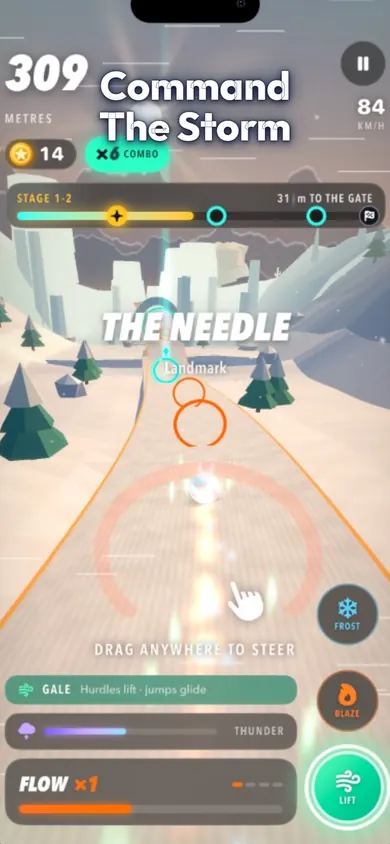
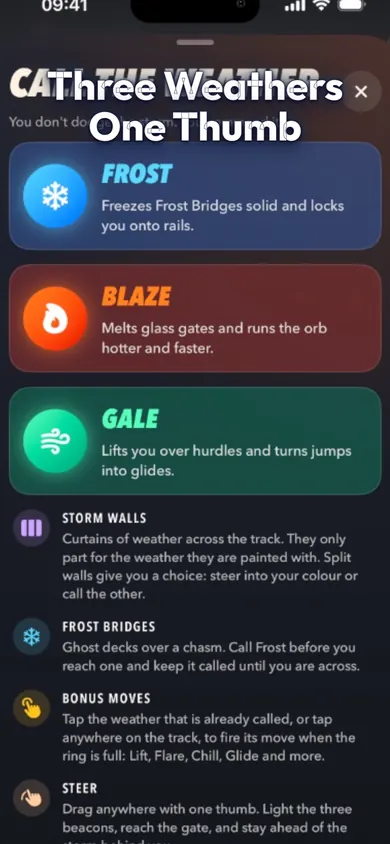
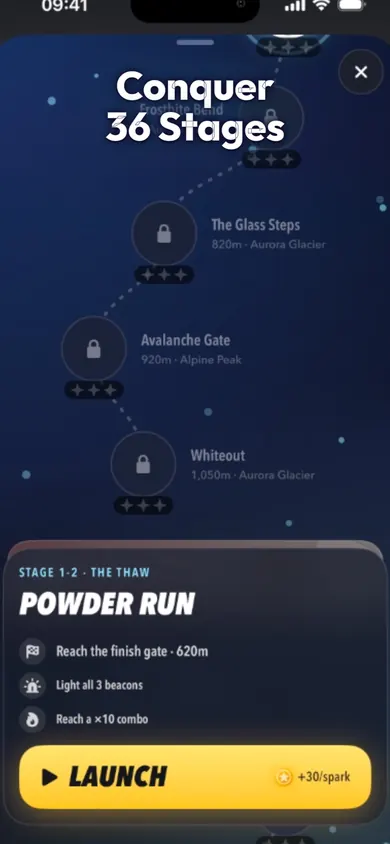
One honest limit: we test on recent iPhones and have not benchmarked every older model. An XR should install and run RushOrb, but if a stage feels choppy, close other apps first, and tell us through the App Store page.
Hand-me-down iPhone questions
Can an iPhone XR still download games?
Yes. The iPhone XR runs iOS 18, and any game whose App Store listing says “Requires iOS 18.0 or later” or lower will install. It will not get iOS 26, so games that need iOS 26 will not, per MacRumors (September 2025).
Can an iPhone 8 still download apps?
Only apps that still support iOS 16 or earlier. The iPhone 8 and iPhone X cannot update past iOS 16, so many newer games will not show an install button.
How much free space does a games phone need?
Leave a few gigabytes free for updates and photos, then add the size of each game. The App Store lists the size on every game's page: RushOrb is 9.4 MB, while many big runners are several hundred megabytes.
How do I free up space on an old iPhone?
Go to Settings, General, iPhone Storage. You can offload an app, which removes the app but keeps its documents and data, or delete it entirely, as Apple's storage guide (October 2026) explains.
Should I erase the iPhone before giving it away?
Yes, if it is leaving your Apple Account. Apple's checklist for giving away an iPhone (May 2026) walks through signing out, then Settings, General, Transfer or Reset, Erase All Content and Settings.
Is RushOrb good on an older iPhone?
It is small (9.4 MB), plays fully offline with no account, and needs iOS 18.0 or later, so an iPhone XR or newer can install it. We have not run frame-rate tests on every model, so treat older phones as a try-it-and-see.
When is Christmas 2026?
Friday, December 25, 2026. If the phone is a gift, do the setup on the 23rd or 24th so downloads finish before wrapping.
Open RushOrb in the App Store
Check the Compatibility line, tap Get, and the old phone has a 9.4 MB storm road ready before the wrapping paper comes out.

Updated November 2026
Related
- RushOrb: the offline runner where you call the weatherRushOrb is a free 3D runner for iPhone with no ads and full offline play. Call Frost, Blaze or Gale to part storm walls across 36 stages.
- iPhone games that work in airplane mode: the 5-minute testFlying for the holidays? Test your iPhone games in airplane mode before you board, in five minutes. Includes a step timer and what usually breaks.
- Is Apple Arcade worth it for kids? Cost per kid, checkedApple Arcade is $6.99 a month for up to six people. Work out the cost per kid before Black Friday, and see when one free game is enough.
- Daily challenge games like Wordle (arcade)Same seed for everyone, one fresh run a day. Play today's 1-minute storm stage, compare 4 daily modes, and see how RushOrb's Daily works.